
15.13 How to Export Student Assessment Data?
Updated 3 weeks ago
Assessment data helps our support team investigate issues that may occur during a test. For example, it can be used when:
A test session cannot continue.
An assessment fails midway.
A student is unable to resume an assessment.
A test does not end properly.
An assessment session is unexpectedly interrupted.
Exporting the assessment data allows our technical team to review what happened and determine whether the student's test progress can be recovered or whether the issue can be resolved.
Assessment data must be exported using the same device and browser that the student used to take the assessment. The data can only be downloaded from the student's dashboard.
Step to download assessment data:
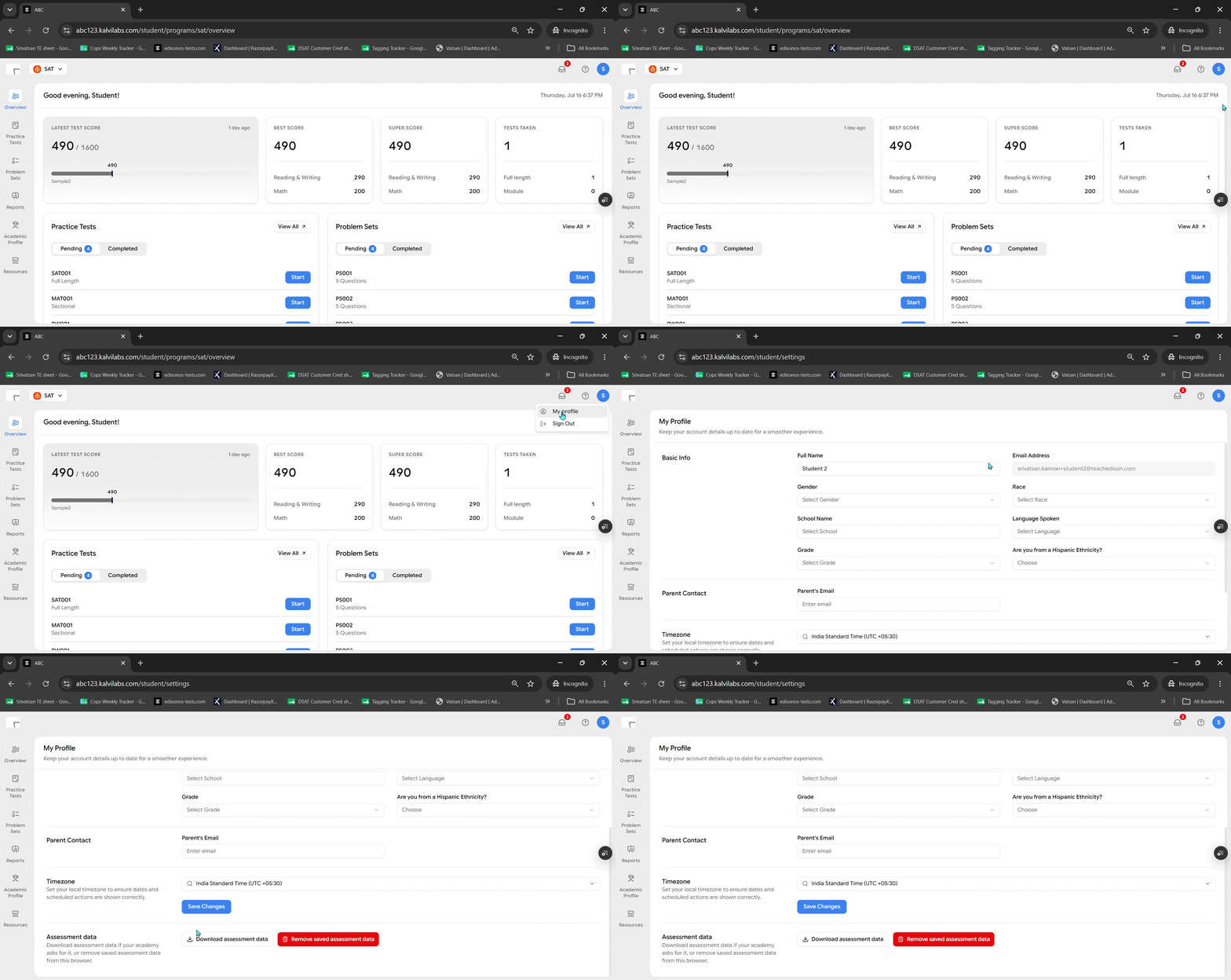
1. Open the profile menu
From the student dashboard, click the profile icon in the top-right corner.
2. Click "My profile"
In the dropdown that appears, select My profile.
3. Download the assessment data
On the My Profile page, scroll down to the Assessment data section and click Download assessment data. The file will download to your device.
Once the file has been downloaded, send it to our technical support team at [email protected].
Our technical team will review the data and investigate the issue to determine the appropriate solution.