
7.11 How to Unassign (Revoke) a License from a Student?
Updated 3 days ago
Revoke a student license from the Console's Licenses page. A license can only be revoked while it is still active and the student hasn't started any test with it yet. Revoking returns the unused seat to your academy's license inventory, where you can assign it to another student.
Revoking happens in the Console, not in the program. The Students tab in a program and the student profile's License history tab do not offer a revoke action.
Before You Begin
You need Console billing access for your academy.
The license must still be unused. If the student has already opened a practice test or problem set with it, the license can no longer be revoked.
Revoke a License
Open the Console and select Licenses.
In the Licensed students list, find the student's row and click on the three dots.
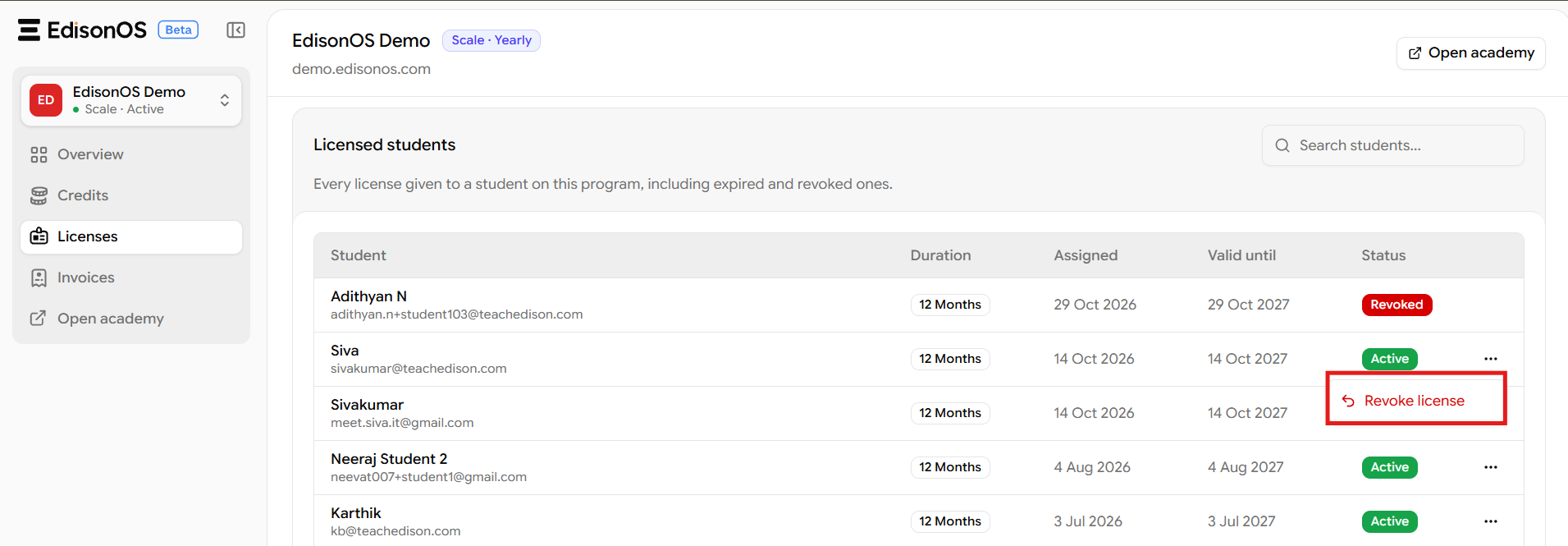
Select Revoke license.
In the confirmation dialog, enter a reason in Why are you revoking it? (for example, that it was assigned to the wrong student). A reason is required, and it is saved with the license's history.
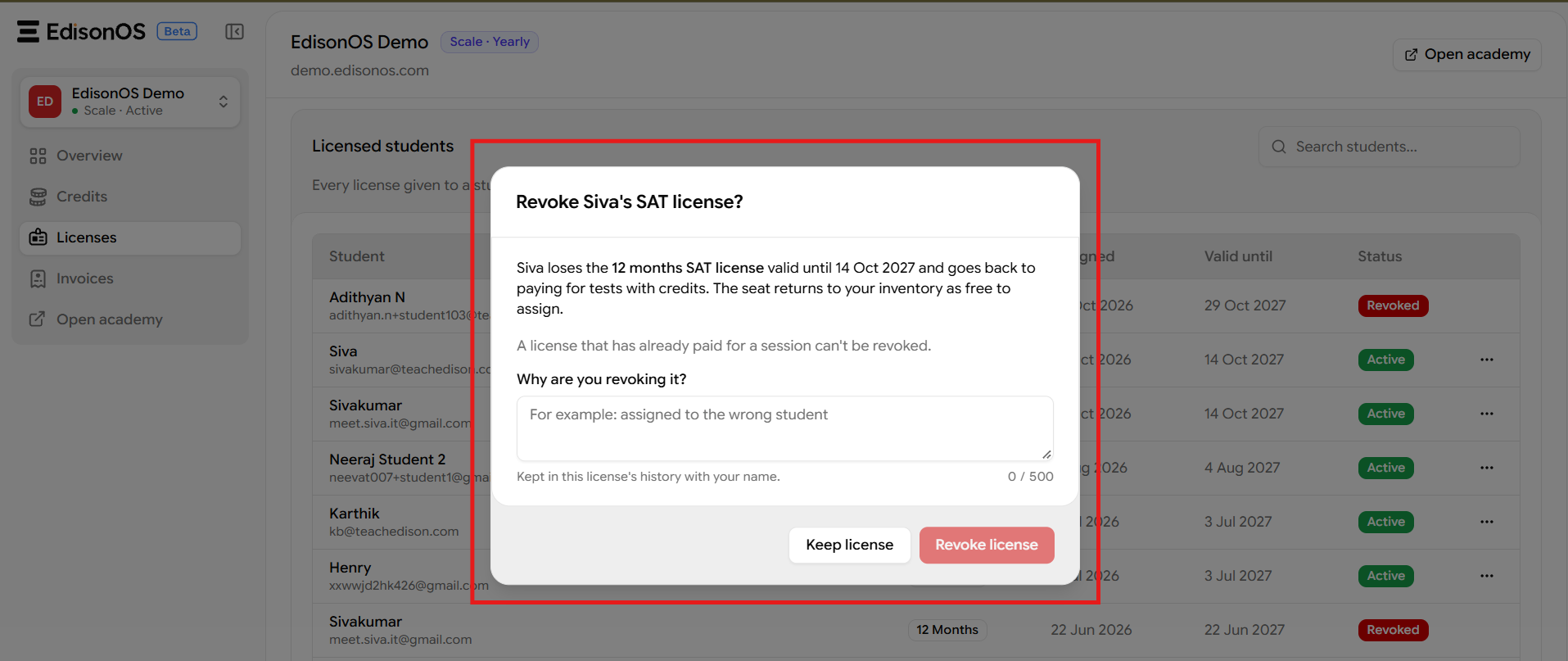
Click Revoke license to confirm, or Keep license to cancel.
Once the revoke succeeds, the student's license is marked Revoked and their seat becomes free to assign again.
When a License Can Be Revoked
You can revoke a license only when all of the following are true:
The license status is active.
The license has not expired.
The license has not been used for any practice-test or problem-set session for that student in that program. A test counts as used the moment it opens, even if the student never finishes it.
The Revoke license menu doesn't check whether the license has been used. A used license can still show the menu, and the revoke fails when you confirm it.
When a License Cannot Be Revoked
Revocation fails in two cases:
The license has expired, was already revoked, or is no longer active. The message reads:
This licence is no longer active and cannot be revoked.The license has already paid for one or more sessions. The message tells you how many sessions it paid for and says it can no longer be revoked.
When the revoke is refused, the dialog shows This license can't be revoked and the reason. There is no way around this: the seat stays with the student until the license expires.
What Happens After Revocation
The seat goes back to your academy's license inventory right away, and you can assign it to another student. Licenses can't be moved straight from one student to another: you always revoke first, then assign again.
The student goes back to using Test Credits right away if they have no other active license in that program. If another valid license remains, it keeps covering their tests.
Your credit balance does not change. Revocation neither adds nor deducts Credits.
You don't get a refund for the unused time. Revoking only changes the license status.
The revoked license stays in the student's License history tab with the status Revoked.
Bulk Revocation
There is no bulk revoke: each license is revoked one student at a time. You can, however, assign licenses to multiple students at once from a program's Students tab.
Related Articles
7.6 Access Models: how licenses and Test Credits fund student tests.
12.2 Managing Subscription: the Console's license inventory and licensed-student list.