
8.1 Creating & Managing Groups
A group is the link between a tutor and their students. It defines who a tutor can see and work with on the platform.
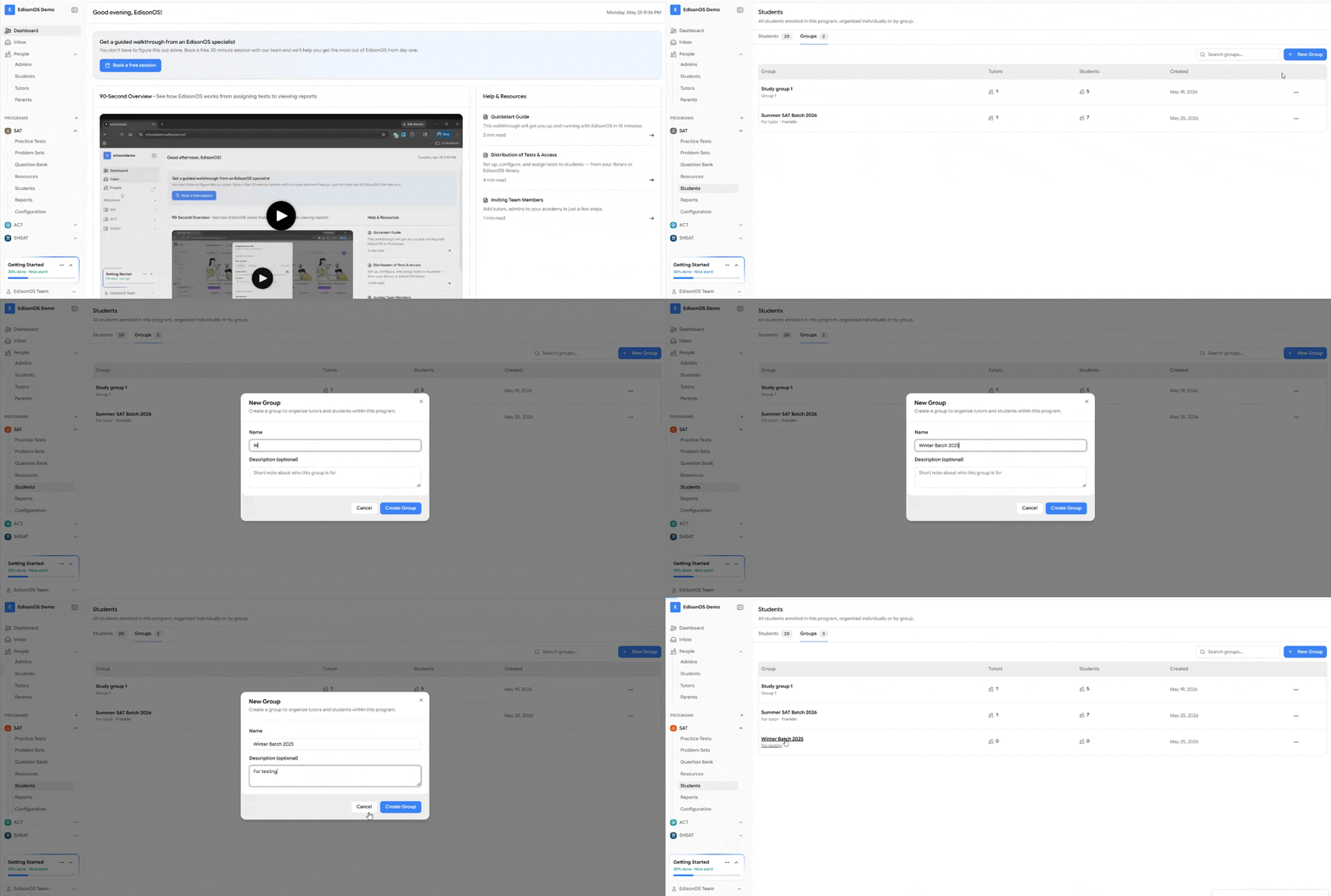
This is the key thing to understand about groups in EdisonOS:
A group exists for a tutor and the students enrolled in it.
A tutor can only see the students who share a group with them, plus themselves as the tutor of that group.
If a tutor has no group, or has a group with no students enrolled, that tutor will not see any students on the platform.
In other words, visibility follows group membership. A tutor never sees the full academy roster only the students assigned to them through a group.
Why groups work this way
Groups keep each tutor's view focused and private:
Tutors see only their own students, not everyone in the academy.
Students are organized under the tutor responsible for them.
Admins stay in control of who teaches whom by managing group membership.
Creating a Group
Go to Programs → Students → Groups.
Click on Create Group.
Give the group a clear name (for example, the tutor's name, batch, or subject).
Assign a tutor to the group.
Save the group.
Once created, the group is ready for students to be enrolled (see 8.2 Assigning Students to Groups).
Managing a Group
From any existing group you can:
Rename the group.
Change or reassign the tutor.
Add or remove students.
Delete the group when it's no longer needed.
Remember: changing who is in a group directly changes what the assigned tutor can see.
Quick summary
A group connects one tutor to their students.
Tutors only see students who share a group with them.
No group or an empty group means the tutor sees no students.
Admins manage visibility by managing group membership.
FAQs
Why can't my tutor see any students? Because the tutor either has no group, or their group has no students enrolled. Add the tutor to a group and enroll students in it.
Can a tutor see the whole academy roster? No. Tutors only see students in groups they're assigned to, never the full academy.
Can a tutor be in more than one group? Yes. A tutor sees the combined students across all groups they're assigned to.