
8.2 Assigning Students to Groups
A group only becomes useful once students are enrolled in it. Because a tutor can only see students who share a group with them, assigning students to a group is what makes those students visible to their tutor.
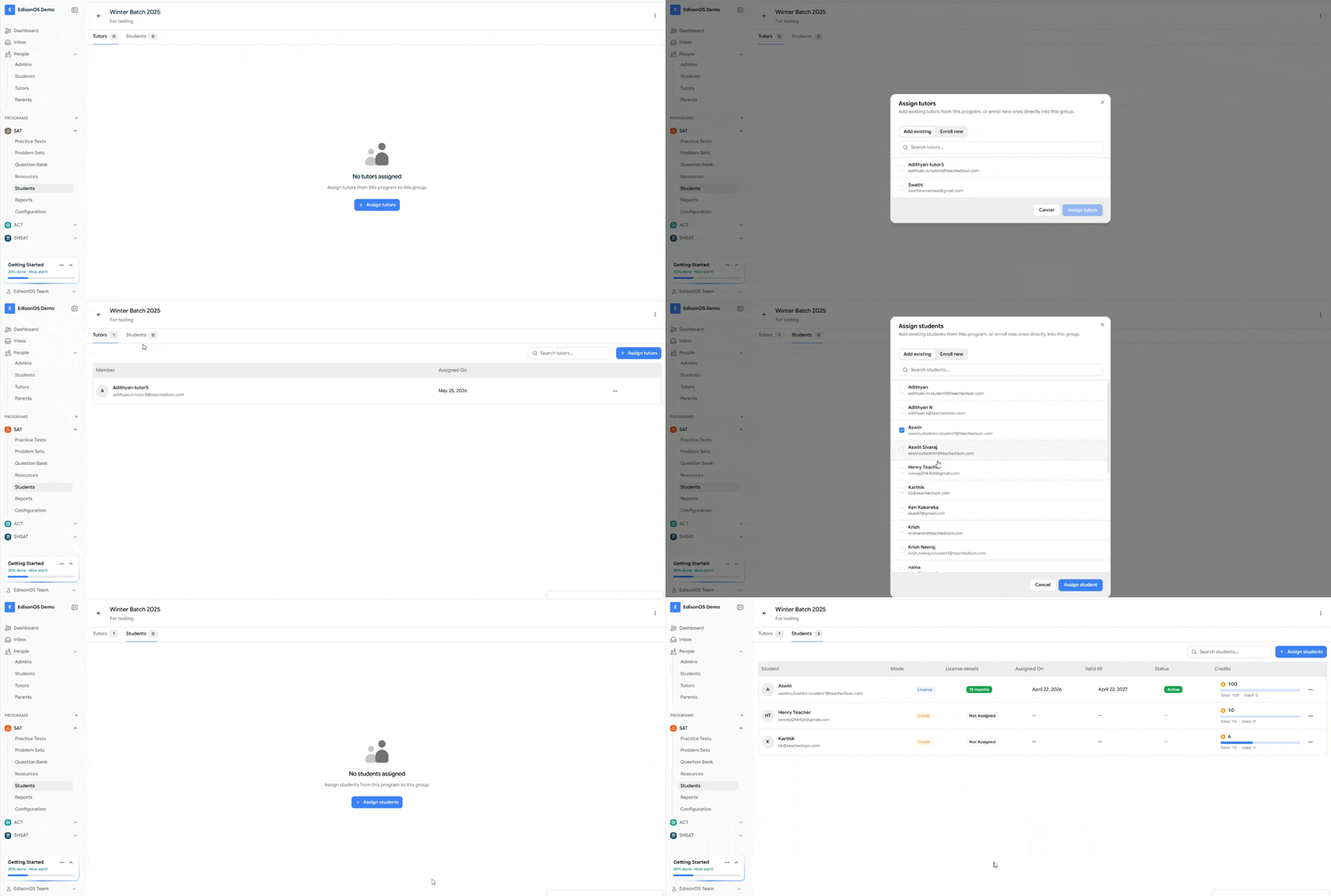
If a group has no students, the tutor assigned to it will see no students on the platform.
Assigning students to a group
Go to Programs →Students → Groups.
Open the group you want to add students to.
Select Add Students.
Choose the students you want to enroll.
Save your changes.
The moment a student is added, they become visible to that group's tutor.
Moving or removing students
Removing a student from a group removes them from that tutor's view.
Moving a student to another group changes which tutor can see them.
A student must be in a group to be visible to any tutor.
Quick summary
Students must be enrolled in a group to be visible to a tutor.
Adding a student makes them visible to that group's tutor.
Removing a student hides them from that tutor.
An empty group means the tutor sees no students.
FAQs
I added a tutor but they still see no students. Why? The group has no students enrolled. Add students to the group to make them visible.
What happens to a student removed from a group? They're no longer visible to that group's tutor. If they belong to no group, no tutor can see them.
Can one student be in multiple groups? Yes. Each tutor of those groups will be able to see that student.