
15.9 Difference Between an Admin and a Tutor
Admins and Tutors are both team members in your academy, but they exist for different reasons. An Admin runs the academy; a Tutor teaches within it. Admins set things up and decide who can do what, while Tutors work with the students they've been assigned and track their progress.
The clearest way to tell them apart is by what they can access on the platform. This article breaks down each role, what each one can see and do, and ends with a side-by-side comparison table.
The Core Difference:
An Admin manages the academy. They enroll people, create groups, build content, configure programs, and control who sees whom. Their access is broad — nearly the same as the Owner.
A Tutor teaches within the academy. They run sessions, assign existing tests, and review progress for the students assigned to them. Their access is limited and read-only for content.
Admins build and control the environment; Tutors work inside it.
What is an Admin?
Admins are team members invited by the Owner to help manage the academy. An Admin has nearly the same level of access as the Owner within the Academy App, which makes this the right role for staff who actively run programs day-to-day.
Admins handle every part of a tutor's setup, enrollment, program assignment, and which students that tutor can see. A tutor can't enroll themselves or choose their own students; that's the Admin's job.
Note: A new SAT instructor joins your academy. An Admin opens People → Tutors, clicks Enroll Tutors, and assigns them to the SAT program. The Admin then creates a group for the instructor's batch and assigns both the tutor and the right students to it. Only then can the tutor start working.
What is a Tutor?
Tutors are team members invited by the Owner or an Admin to teach students and monitor their performance and progress. They deliver sessions, assign tests to the students in their groups, and review how those students are doing.
A tutor can be assigned to one or more programs, and within each program to one or more groups. The group decides which students they see; outside of groups, they see the full program roster unless you restrict it.
Note: A tutor wants to start a new weekend batch. They can't create it themselves. They ask an Admin, who sets up the group and assigns the tutor and students to it. The tutor then sees a "You have been assigned to a group" notification and can start running sessions and assigning tests to that group.
Their Access to the Platform
The difference between the two roles is most visible in what each one can access once they log in.
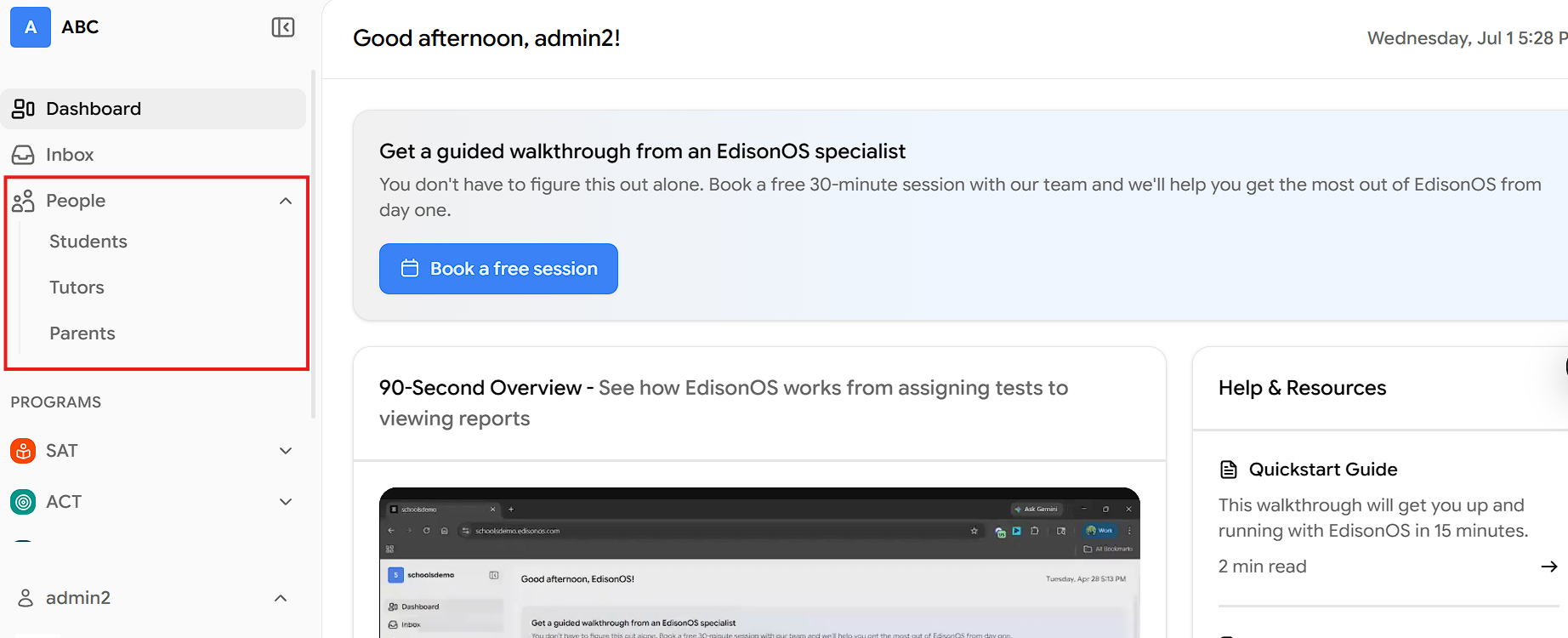
Admin access:
Sidebar: Includes a People section with Students, Tutors, and Parents. Each has an action button - Enroll Students, Enroll Tutors, Add Parent for bringing new people into the academy.
Inside a program: The menu includes Practice Tests, Problem Sets, Question Bank, Resources, Students, Reports, and Configuration. The Question Bank and Configuration options are the key tell only Admins can build content and change how a program is set up.
Groups: Within a program's Students area, Admins use the Groups tab to Create Group (name and optional description) and then Assign tutors and students into it.
Scope: Full management access across the programs they were granted at enrollment.
Tutor access:
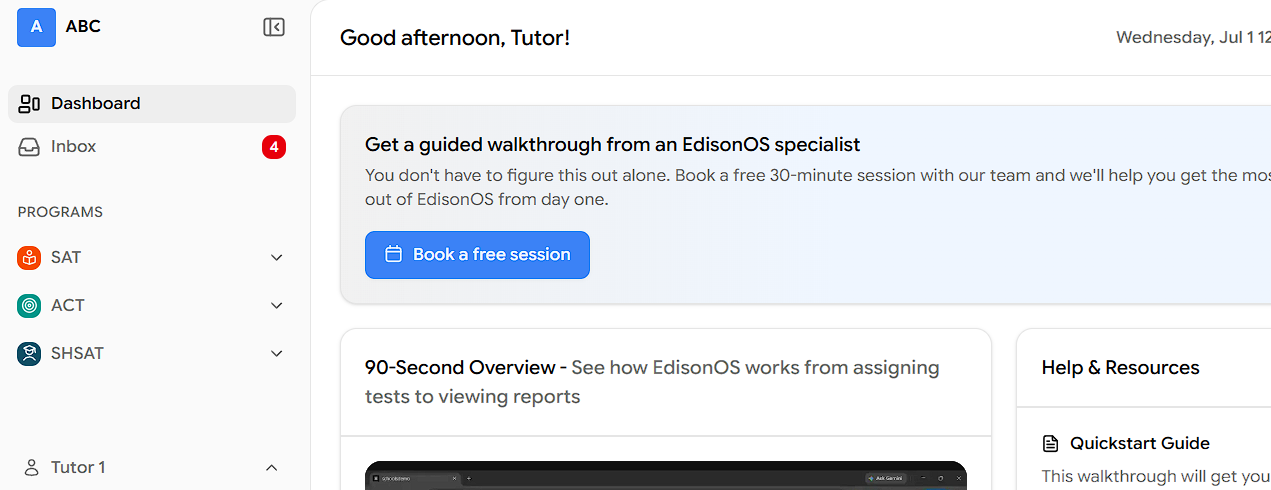
Sidebar: Leaner. Shows Dashboard, Inbox, and the Programs they've been assigned to — no People section, because tutors don't manage other people.
Inside a program: The menu shows Practice Tests, Problem Sets, Resources, Students, and Reports — no Question Bank and no Configuration. They can assign and review, but not build or reconfigure.
Groups: Tutors don't create groups or assign people. When an Admin adds a tutor to a group, the tutor simply receives a notification in their Inbox — for example, "You have been assigned to Grp 3."
Note: A tutor can only see students after an Admin assigns them to a group. Until this assignment is done, the tutor will not see any students on the platform.
Admin vs Tutor: Side-by-Side
Platform area/capability
Admin
Tutor
Main purpose
Runs and manages the academy
Teaches and monitors students
Overall access level
Nearly the same as the Owner
Limited; read-only for content
"People" section in sidebar
Yes (Students, Tutors, Parents)
No
Enroll tutors
Yes
No
Enroll students
Yes
No
Add parents
Yes
No
Create groups
Yes
No
Assign tutors & students to groups
Yes
No (gets notified when added)
Assign practice tests & problem sets
Yes
Yes (to their assigned students)
Question Bank (create/edit content)
Yes
No
Program Configuration
Yes
No
Resources
Yes
Yes
View reports & analytics
Yes (assigned programs)
Yes (only to their assigned students)
Choose which students they see
Yes (assigns them)
No (decided by their admins)
The two roles complement each other. The Admin builds the structure programs, groups, enrollments, and content, and the Tutor operates inside that structure to teach and track students.