
15.18 Browse the SAT Question Bank
The SAT Question Bank in the EdisonOS Library contains a comprehensive collection of SAT questions organized to support both full-length practice tests and skill-based practice. Questions are grouped into folders, making it easy to locate the content needed for creating assessments or reviewing specific SAT concepts.
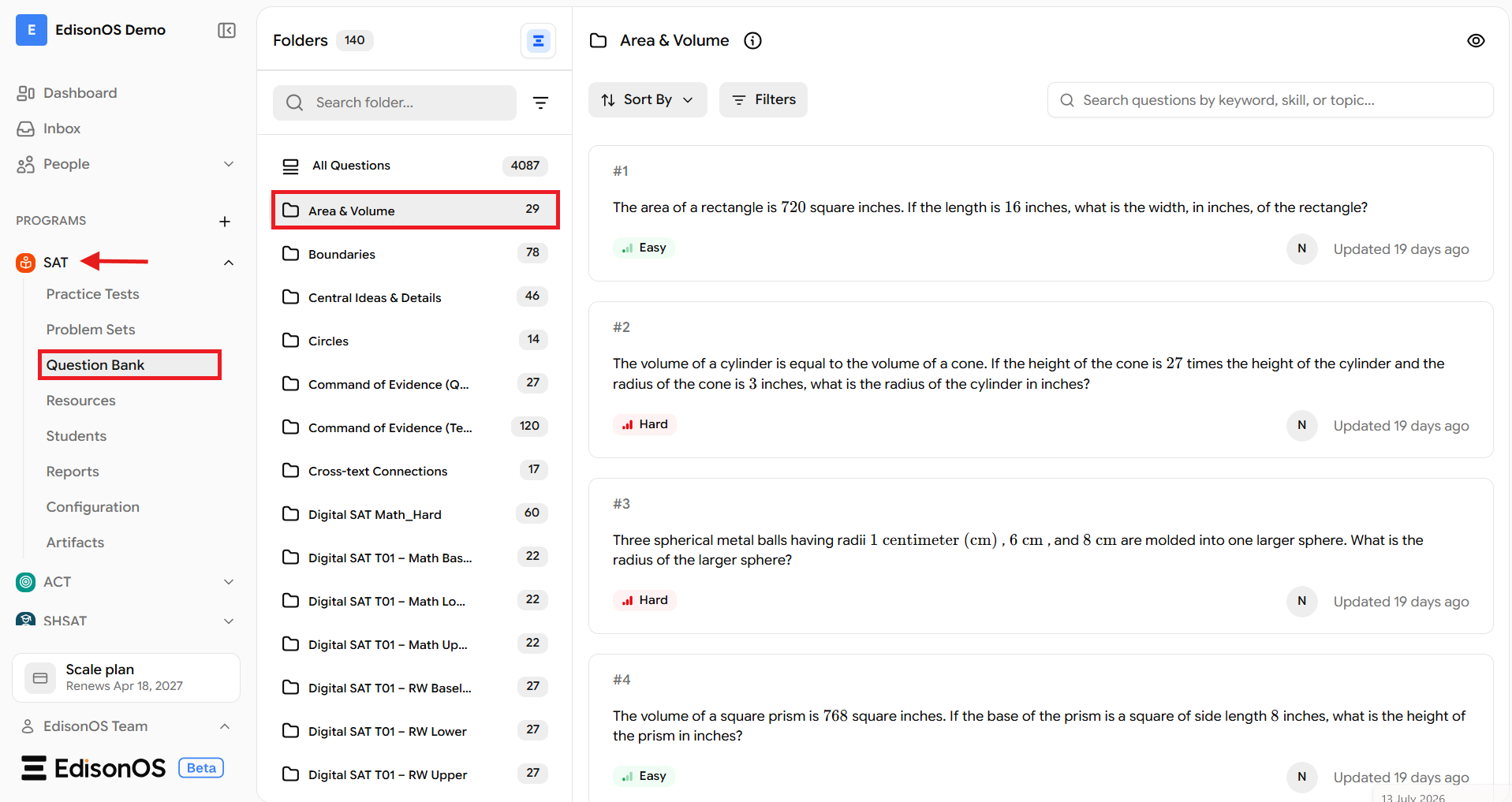
Access the SAT Question Bank
Navigate to SAT from the left navigation menu.
Click Question Bank.
The Question Bank displays all available SAT question folders in the EdisonOS Library.
Understand the SAT Question Bank Structure
The SAT Question Bank is organized into two types of folders:
Full-Length Test folders
Skill-Based folders
Each folder type serves a different purpose, allowing you to either work with complete Digital SAT practice tests or focus on specific SAT skills.
Browse Full-Length Test Folders
The Question Bank includes folders for every Digital SAT practice test, such as Digital SAT T01, Digital SAT T02, Digital SAT T03, and more.
Each Digital SAT test is organized into six folders:
Math Baseline
Math Lower
Math Upper
Reading & Writing Baseline
Reading & Writing Lower
Reading & Writing Upper
Together, these six folders represent the complete question pool for a full-length Digital SAT practice test. This organization allows you to browse questions from individual modules while preserving the structure of the original practice test.
Example: If you want to review questions from Digital SAT Test 01, open the corresponding Digital SAT T01 folders to access questions from its Math and Reading & Writing modules.
Browse Skill-Based Folders
In addition to full-length test folders, the Question Bank also contains folders organized by individual SAT skills.
Examples include:
Boundaries
Area & Volume
Linear Equations in Two Variables
Cross-text Connections
Command of Evidence
Central Ideas & Details
Words in Context
Each folder contains questions related to a single SAT concept, making it ideal for targeted practice.
Example: If you want students to practice only Boundaries, open the Boundaries folder to access all questions related to that specific SAT skill.
Review Questions Within a Folder
Open any folder to browse the questions it contains.
For each question, you can review details such as:
Question content
Difficulty level
Question tags
Last updated date
This allows you to review the available questions before using them in an assessment.
Preview Questions
Click Preview to view questions in the same interface that students experience during an assessment.
Previewing questions helps you verify the question format, navigation, and overall test experience before assigning a practice test or creating an assessment.
When to Use Each Folder Type
Use Full-Length Test folders when you want to work with questions from an entire Digital SAT practice test while maintaining the original test structure.
Use Skill-Based folders when you want to focus on a particular SAT concept or create targeted practice for a specific learning objective.
The SAT Question Bank serves as the source of questions for both Practice Tests and Problem Sets. Full-Length Test folders preserve the structure of an official Digital SAT practice test, while Skill-Based folders help you create focused practice on individual SAT concepts.