
15.5 Assigned student license shows limited Credits
Understanding Assigned Student Licenses vs Test Credits
Overview
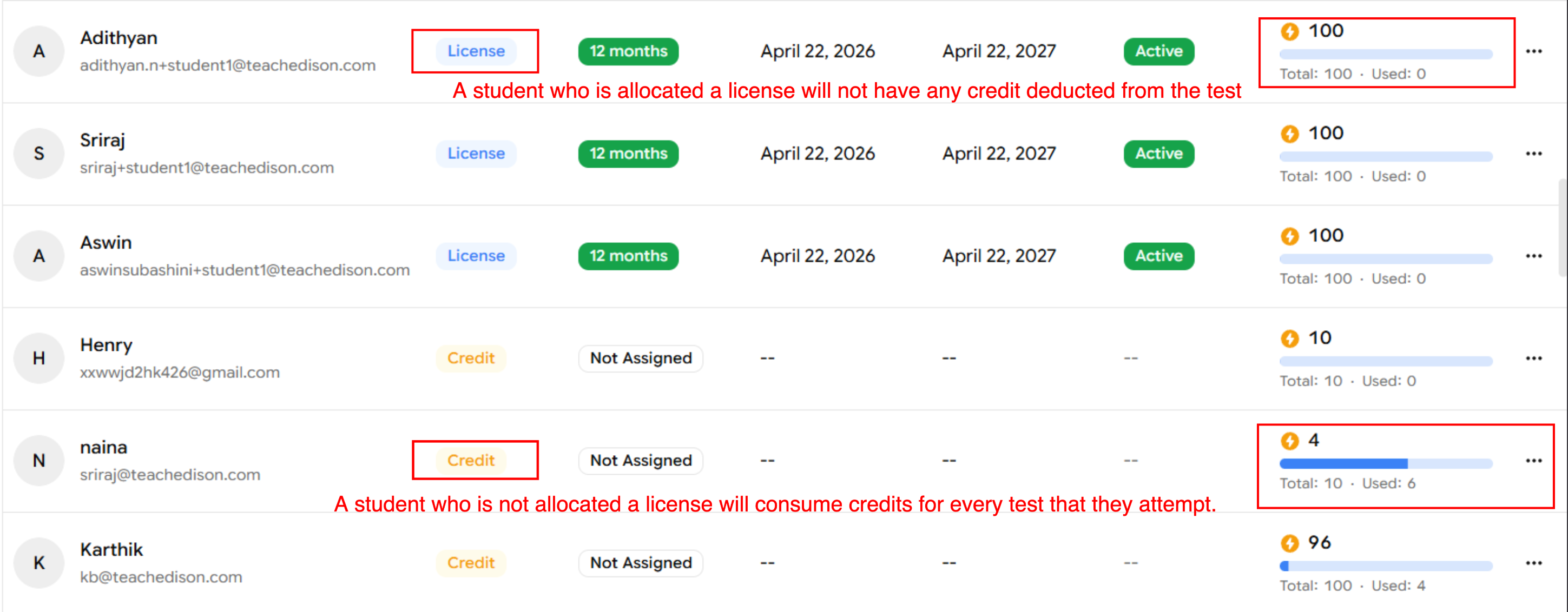
When you assign student licenses in a program, students with a license can take tests without consuming test credits. The platform may still display a credit balance in student accounts, but assigned licenses prevent credits from being deducted when licensed students take tests.
Key points
Students with an assigned License can take tests unlimited times (without using credits.
Students without a license will use the available Credits when they take tests.
The student account UI may still show a credit balance even for licensed students; this is a display detail and does not indicate credits will be consumed.
Where it appears in a program
Each student entry shows either License or Credit depending on what is assigned. If it shows License, tests taken by that student will not reduce your credit balance.Program > Students
Troubleshooting
If credits appear to be deducted for a licensed student, double-check that the student was correctly assigned the license in the program roster.